A 3D scanner can produce an impressive digital replica of a physical object, but getting a useful model is only part of the job. For engineers, designers, and automotive professionals, the real value often appears later, when that captured information needs to become something they can actually edit, measure, or build from.
That is where scan to cad workflows become important. Moving from scanned geometry to a usable design requires more than simply pressing the scan button. The scanner, tracking method, software, object size, level of detail, and intended application all influence the final result. Choosing equipment with the entire workflow in mind can therefore save considerable time later.
Start With the End Result
Before comparing scanners, it helps to answer one basic question: what will you do with the data after scanning? A person creating a visual model for presentation has different requirements from an engineer rebuilding a mechanical component. Likewise, someone capturing an entire vehicle needs a different approach from someone documenting a small bracket. Think about the final task first:
- Reverse engineering
- CAD reconstruction
- Inspection
- Product development
- Custom fabrication
- Digital documentation
If the final goal involves precise design work, the ability to move smoothly from scanning software into a CAD environment becomes particularly important.
Scan to CAD Is More Than Exporting a Mesh
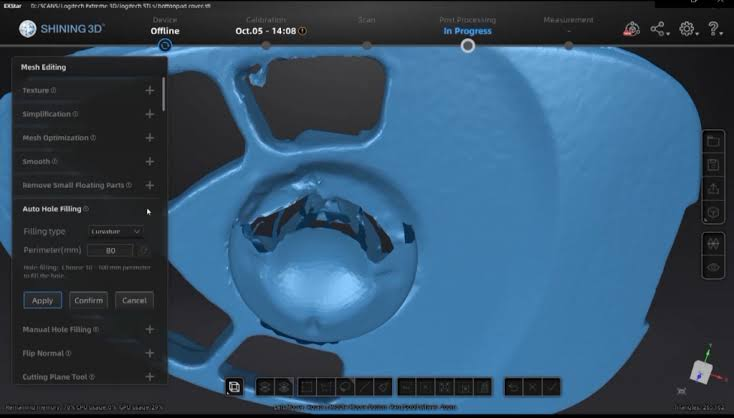
One common misunderstanding is that a scanned mesh is automatically an editable CAD model. It usually isn’t. A scanner captures the object’s physical geometry and typically produces a point cloud or mesh. CAD systems, on the other hand, are designed around editable features, surfaces, solids, dimensions, and design relationships.
That means a scan to CAD workflow may involve several stages. The captured mesh can be cleaned, aligned, measured, and used as a reference while the designer reconstructs the geometry needed for a professional CAD model. For straightforward projects, this may be relatively quick. Complex components can require more modeling work. Understanding this difference helps users set realistic expectations from the beginning.
Why Scanning Hardware Still Matters
The quality of the initial scan influences everything that follows. Poor tracking, missing geometry, excessive noise, or insufficient detail can make downstream CAD work more difficult. A strong scanning setup gives designers better information to work with before reconstruction even begins. This is one reason professional users often pay attention to:
- Accuracy
- Resolution
- Tracking stability
- Scanning speed
- Working distance
- Surface handling
- Software functionality
The best specification depends on the application rather than simply choosing the scanner with the largest number on a product sheet.
Where Tri-Mode Scanning Can Be Useful
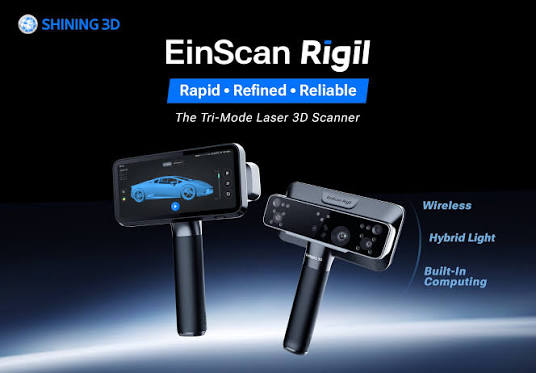
For people researching equipment such as the Afinia EinScan Rigil Tri-Mode Laser 3D Scanner, the appeal is largely connected to flexibility. The EinScan Rigil provides three operating modes: standalone, wireless PC, and wired PC. Standalone processing allows scanning without a separate computer connection, while wireless and wired PC modes provide access to additional computing resources. That flexibility can matter when scanning conditions change.
A quick scan at a workshop may be more convenient with a standalone setup. A larger or more demanding project may benefit from connecting to a computer. Wired operation can also be useful where a stable connection is more important than mobility. Instead of forcing every project into one operating style, the three modes provide different ways to approach the same broader workflow.
Blue Laser and Infrared Have Different Roles
The EinScan Rigil also combines blue laser and infrared technology rather than relying on one scanning method for every situation. Its blue laser modes include crossed and parallel laser lines, while its infrared mode is intended for rapid scanning and wider coverage. This becomes useful when a project contains objects of different sizes or requires different levels of detail. For example, a detailed mechanical feature may benefit from a laser scanning mode, while larger areas can be approached differently when speed and coverage are priorities.
The scanner also allows its laser lines to be switched during scanning, with data from different modes capable of being combined within the same project. That kind of flexibility can reduce the need to treat an entire project as if every surface has identical requirements.
CAD Workflows Benefit From Better Alignment
Alignment may sound like a technical detail, but it can have a major effect on the usefulness of scan data. When multiple views are captured, they need to be combined into a coherent representation. If alignment is poor, downstream modeling can become unnecessarily complicated.
The EinScan Rigil supports several alignment approaches, including markers, features, and global markers for laser scanning, with additional options available for its infrared mode. For complex objects, choosing an appropriate tracking method can help maintain consistency as the scanner moves around the subject.
Don’t Forget the Software
Hardware gets most of the attention, but software can determine how practical the overall workflow feels. The Rigil ecosystem includes EXScan software for scanning and EXModel for reverse-engineering workflows. According to the manufacturer, EXModel provides tools for transforming mesh data into professional CAD solid models.
This is particularly relevant to users whose objective is not simply to create a digital copy but to turn captured geometry into something useful for engineering and manufacturing. The software should therefore be evaluated alongside the scanner rather than treated as an afterthought.
Think About the Working Environment
A scanner may perform differently depending on where it is used. Workshop projects, automotive work, outdoor scanning, and controlled studio environments can present very different challenges. Object size, surface finish, lighting, and available workspace all deserve consideration. The afinia einscan rigil tri-mode laser 3d scanner is designed with environmental adaptability in mind, including support for scanning challenging surfaces and use in strong outdoor lighting conditions.
Still, good preparation remains important. Cleaning the object, planning the scanning path, and making sure critical areas are accessible can improve the quality of the final dataset regardless of the equipment being used.
A Better Way to Evaluate Scanning Equipment
Instead of asking, “Which scanner has the best specifications?” A more useful question is, “Which scanner fits the work I actually need to do?” Consider the complete journey:
Object → Capture → Alignment → Cleanup → CAD reconstruction → Design changes → Manufacturing
If a scanner performs well at the capture stage but creates unnecessary complications afterward, its impressive specifications may not translate into a better working experience. EINSTAR is one brand worth exploring for users interested in this broader digital workflow, particularly those looking at scanning solutions that connect physical capture with design and reverse-engineering tasks.
Conclusion
A successful scan to CAD workflow depends on more than scanner accuracy alone. The quality of the captured data, alignment method, software, operating environment, and intended CAD application all contribute to the final result. For professionals comparing equipment such as the Afinia EinScan Rigil Tri-Mode Laser 3D Scanner, its combination of standalone, wireless PC, and wired PC operation, along with blue laser and infrared scanning capabilities, provides a flexible approach to different scanning situations. The important lesson is to choose technology according to the complete workflow rather than one isolated feature. When scanning and CAD are treated as parts of the same process, physical objects can become much more useful sources of digital design information.
FAQs
What does scan to CAD mean?
Scan to CAD refers to the process of using 3D scan data as the foundation or reference for creating an editable CAD model. The scan may require cleanup, alignment, measurement, and feature reconstruction before becoming a finished design.
Is the Afinia EinScan Rigil Tri-Mode Laser 3D Scanner suitable for CAD workflows?
The EinScan Rigil is designed to support professional 3D modeling and reverse-engineering workflows. Its software ecosystem includes tools intended to help move scan data toward CAD modeling.
What are the three operating modes of the EinScan Rigil?
The scanner offers standalone, wireless PC, and wired PC modes. These options allow users to prioritize portability, additional computer processing, or a stable wired connection depending on the project.
Why does scanning accuracy matter for CAD?
More reliable scan data gives designers a better reference for reconstruction and measurement. Poor or incomplete data can increase the amount of manual correction required later.
Can different scanning modes be used in one project?
Yes. The EinScan Rigil allows users to switch between its laser line options during scanning, and the captured data can be merged to combine speed and detail within a project.
